| Topic | Name | Description |
|---|---|---|
Zoom sessions are a real-time opportunity get together virtually and interact with each other, ask questions, and share ideas. Sessions are suggested for this course and recorded if you miss them. Find the current schedule and link to each session here. Recordings are posted within one day of the session. |
||
| Course Documents & Tutorials | ||
Tips for success in this online course
|
||
Take a look at this "How to Submit an Assignment" tutorial to be sure you follow all the steps to successfully submit your assignments for grading. Sometimes assignments are left in 'draft' form and there are a couple of steps you need to do to move your assignment from 'draft' to 'submit'. 😊 Thank you! |
||
Be sure to update (in your preferences) how you would like to receive your notifications. You are automatically subscribed to forums and you will get an email in your inbox every time someone posts. Open this page to learn how to change the settings if you do not want emails every time someone posts. |
||
Please fill out this short online survey which will be helpful for your instructor to learn more about you, your location, your gardening program, program goals, and what you wish to gain from this course. |
||
| Introductions & Module One: Growing Your Team; Community Partnerships: June 29-July 10 | A community or school garden is first and foremost a community of people! Identifying and growing this community takes time and effort. For this reason, we encourage garden organizers to focus early on engaging potential partners and understanding their interests and talents. Having many voices in the development process, including educators, participants, community partners and volunteers, will lead to more inclusive programs, and greater interest and participation in the garden in future years. |
|
In Assignment 1.2 you analyzed your volunteer needs based on different stages of the garden project. Once you have a general idea of the types of volunteers you need, when you need them and how many, you can design volunteer organizational tools that will work for your team and garden project. There are many ways you can set up a spreadsheet to track volunteer roles needed for your project. Here is one example, based on the commitment level required of the volunteer: ongoing, seasonal or one-time. Something like this can make it easier to match the volunteer role with the amount of time/interest of the volunteer. This makes it easier to respond quickly to offers of volunteer help, whether from a group looking to donate help through a team-building event, or an individual who wants to contribute their time. There are many other ways you could organize a spreadsheet of volunteer roles - for example, listing projects in a calendar format if that makes more sense for your program. The most important thing is that it's easy to use by everyone involved, and can easily be added to as new ideas and projects come up. |
||
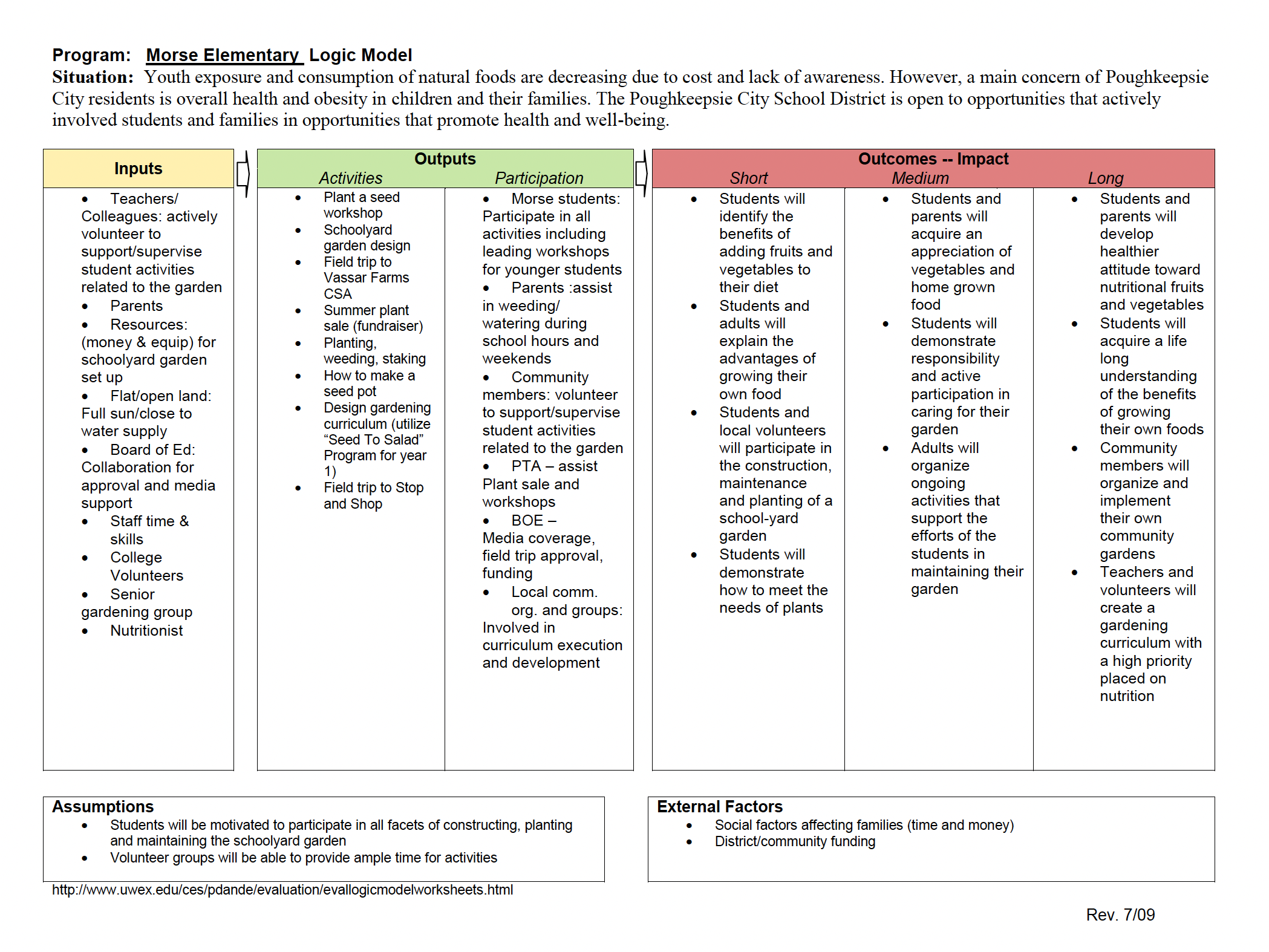
| Module Two: Using Logic Models to Define Program Goals: July 13-17 | In Module 2 you will start by defining your program goals and developing a plan summary. We will use logic models to formulate an idea into a plan that can be implemented, evaluated and communicated more effectively. |
|
|
||
Here is an excellent resource, compiled by LSU with Cooperative Extension specialists across the US (including Cornell Cooperative Ext. and your instructor!). It's an older publication and some of graphics do not line up, but the content is there and very useful as you plan your programs. |
||
| Module Three: Assessing Your Site & Tapping Your Community Resources: July 27- August 7 | Often we have untapped community resources for our garden projects right under our noses! Think strategically about how you can access these resources to help support your garden-based learning program. You will start by assessing your physical site for the garden, plan ahead for garden maintenance, and do some research on where to find free and low-cost garden materials for your project. |
|
Here are a few good publications on best practices on starting a school garden. These are not in your required readings, but I suggest you save them for future reference as they will be helpful in starting and sustaining a healthy and productive garden. Checklist for Starting a School Garden from NC Cooperative Extension: https://guilford.ces.ncsu.edu/school-garden-planning-checklist/ |
||
Here is a variety of resources and examples of best practices on starting a community garden. These are not in your required readings, but I suggest you save them for future reference as they will be helpful in starting and sustaining a healthy and productive garden. Cornell Garden-Based Learning: The Top Five Things to Know While Working with a Community Garden Cornell Cooperative Extension of Columbia & Greene Counties Master Gardener's Podcast: |
||
Below is a sample maintenance schedule, watering schedule and parent/volunteer recruitment poster you can use or adapt for your own garden project. |
||
| Module Four: Evaluation and Assessment; Curriculum Toolbox: July 27- August 7 | We touched on evaluation methods briefly in Week 2, and this week you will think more deeply about what you want to evaluate in your garden-based learning program, as well as how. You may want to go back and re-read the section on Evaluation in Getting Started with Garden-Based Learning, pages 16-19, before you begin this week's lessons. After working on your evaluation plan, you can start exploring the huge wealth of different gardening activities and curricula out there. Have fun assembling a toolbox of lesson plans and activities for your gardening program! |
|
Now that we are more than halfway through the course, you may benefit from watching this past Zoom session and take away some good ideas from the students in the Fall 2025 session of this course. Here you will learn about their projects, questions they had at this point of the course, and more detail of Module 4 assignments. |
||
These activities are part of the NYS Master Gardener curriculum, and were adapted for the Gardening in Our Warming World: Youth Grow! curriculum and the online Organic Gardening course. |
||
| Module Five: Creating Sustainable Gardens; Finding Funding: August 10-21 | When thinking about sustainable gardens, we usually think about practices that are environmentally sustainable, such as using organic methods, conserving water, building soil etc. This week we will focus on the broader sustainability of your garden-based learning program: Is your garden welcoming and inclusive to all? Do you have a solid team of educators, participants and volunteers on board? Will you need funding? Developing a sustainability plan now will help you avoid setbacks later. |
|
| Module Six: Promotional Tools, Project Portfolio; Next Steps: August 10-21 | In these last weeks, you will pull together all of the components of your project portfolio, and decide on the next steps you will take to move your garden-based learning program forward. |
|
| Examples of Student Final Portfolios | ||
| Additional Resources for School and Community Gardens | Resources on managing gardens and volunteers, including samples of volunteer handbooks |
|
Check out the Youth Lessons at https://gardening.cals.cornell.edu/lessons/ In the Gardening in Our Warming World: Youth Grow! curriculum, you can find activities:
https://jmgkids.us/: I have used all of these curricula, The JMG Core Curriculum includes some of what is found in the more focused Health and Nutrition from the Garden, Wildlife Gardener, Learn, Grow, Eat (newest) and my favorite, Literature in the Garden curricula. The Jr MG Learn, Grow, Eat & Go (LGEG) is an evidence-based curriculum, beginning with the Learn, Grow, Eat & Go curriculum for Elementary students, there is now a new Early Childhood LGEG curriculum expands access to preK-Kinder students! National AG in the Classroom has any new, updated resources, including career exploration and Agribusiness. You can also find local resources in the Teacher Center at https://agclassroom.org// KidsGardening.org has a wealth of information from garden planning, school gardens as a business, grant opportunities to activities.American Horticultural Society https://ahsgardening.org/ hosts an Youth Gardening Conference, and has great resources. https://ahsgardening.org/gardening-resources/gardening-with-kids/ LifeLab: https://www.lifelab.org/school-garden-resources Here is a list of different curricula to explore, that were shared by students of this course. Thank you! Beetles Project has resources for outdoor science. Project Learning Tree has lesson plans for school/community gardens: Wildwonder.org has teaching resources for nature and garden sketching/journaling. |
||
Here you will find videos of past presentations from our Sustainable Landscapes Lunch and Learn Series:
|
||
Do you know of another garden program or resource to add to this list? |
||
New resources added on 1/17/25 |
||
| Gardening Resources & Horticultural Topics | ||
Here is a series of podcasts by the Master Gardener Volunteers of Cornell Cooperative Extension of Columbia & Greene Counties, and their conversations on gardening, ecology, and nature topics. This weekly podcast is designed to entertain, inspire, educate and inform listeners who want to begin or enhance their gardening journey. |
||
This site assessment booklet, written by former CCE staff Charlie Mazza, has 12 different activities for assessing the physical characteristics of your garden site: sun/shade, soil, wind, slope, existing plants, wildlife interference, etc. These assessment exercises are useful for learning more about an existing or proposed garden site, and they are fun and interesting to conduct with youth and/or adult participants at your garden. These are the same assessment exercises used by students in the Organic Gardening and Introduction to Garden Design courses. You can use them for your home garden as well. |
||