Course Overview - Important Course Info to Get Started and Qualify for the Certificate
Welcome to IPM Greenhouse Scout School! We welcome your input on what we do well and poorly!
How to Navigate the Course
The course is divided into seven weekly modules. Each module contains:
- Link to the Zoom webinar.
- A page with the Zoom recording, presentation slide decks and videos presented during the webinar.
- Assignment Discussion Board with information on that week’s assignment and a place to post your results
- Weekly Quiz to Check Your Knowledge
- A
Q&A Board to ask your questions about the weekly content
You can access the content for all of the weeks from the home page. Click on the Q&A, webinar materials, quiz or assignment to access it directly.
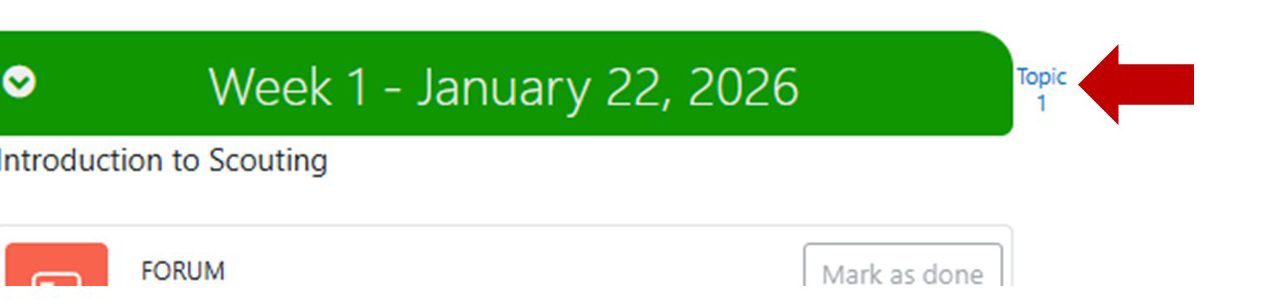
To view only the content for a single week, click on the topic # next to the week heading on the home page.
*** You must subscribe to all the forums to participate - for Q&A and for assignments***
Course Activities and Assessments
Each
week will have both a live webinar and asynchronous learning. If you can’t be
there for the live session, you can watch the recorded session which will be posted in the next few days. Students will be
assessed through assignments and participation in forum discussions. Quizzes are not part of the assessment but are very valuable to learning the information.
The assignments require a greenhouse to scout in - or some group of plants. Let us know if you need help finding one.
In order to receive a certificate, it is important to participate as much as possible in the course. You must attend or watch at least 6 of the 7 sessions, do at least 5 assignments (but doing them all will give you more practice), and post a question or comment for at least 5 sessions.
You will also receive a badge that can be used in places like Linked In to show you have accomplished the certificate.
How to post in the forums:
- Click on Reply and type your response in the text box.
- To post an image click on the Advanced link and then click on the image icon in the tool bar at the top of the text box.
- To post an attachment, click on the Advanced link and drag and drop your file in the attachment box.
- Click on Post to forum to submit your reply.
If you need help with Moodle, contact cce-helpdesk@cornell.edu.
If you have other questions, contact Betsy at eml38@cornell.edu.
Course accommodations
We are trying to make this course as accessible as possible. Closed captioning will be available for all sessions and is also part of the recordings and speakers will leave their video cameras on to facilitate lip reading. In order to get the recordings posted as soon as possible, we won’t edit the captions. If this is a problem for you, please contact Betsy at eml38@cornell.edu. You can also contact her if there are other accommodations that would be helpful to you.